DebtPath IQ™ screenshot tour

The built-in User Guide

The whole manual, inside the app, offline — written for someone who is not a finance person.

Overview

DebtPath IQ™ carries its own manual. Every tab, every calculator, and every money word is explained in plain English right inside the app — no website to hunt through and no internet connection needed. Below are four pages from it, so you can judge the writing before you buy rather than after.

Screens

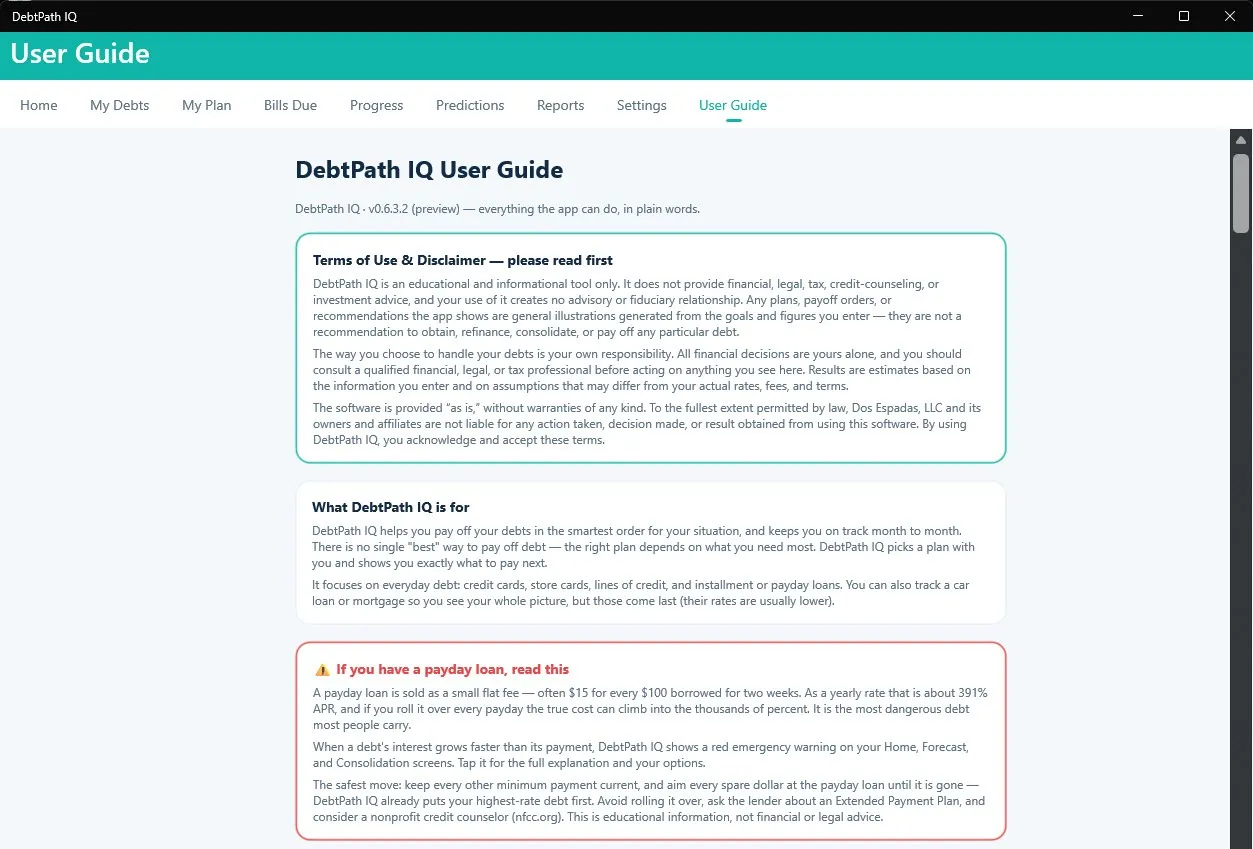
  1. The top of the DebtPath IQ User Guide, headed “DebtPath IQ User Guide · v0.6.3.2 (preview) — everything the app can do, in plain words.” A bordered panel titled “Terms of Use and Disclaimer — please read first” states the app is an educational and informational tool only, gives no financial, legal, tax, credit-counseling, or investment advice, creates no advisory or fiduciary relationship, and that all financial decisions are the user’s own. A second panel, “What DebtPath IQ is for,” explains it helps pay off debts in the smartest order for your situation and focuses on everyday debt. A third panel outlined in red, “If you have a payday loan, read this,” explains that a payday loan sold as $15 for every $100 borrowed over two weeks is about 391% APR, that rolling it over can push the true cost into the thousands of percent, that the app shows a red emergency warning when a debt’s interest grows faster than its payment, and advises keeping other minimum payments current, avoiding rollovers, asking the lender about an Extended Payment Plan, and considering a nonprofit credit counselor at nfcc.org.
    It opens by telling you what it is not

    The manual opens with the disclaimer, not with a sales pitch: this is an educational tool, not financial advice, and every decision stays yours. Then read the red panel. It explains what a payday loan really costs — $15 per $100 for two weeks is about 391% a year — and points you to an Extended Payment Plan and a nonprofit counselor at nfcc.org. A program that wanted to look clever would not send you somewhere else for help. This one does, on the first page.

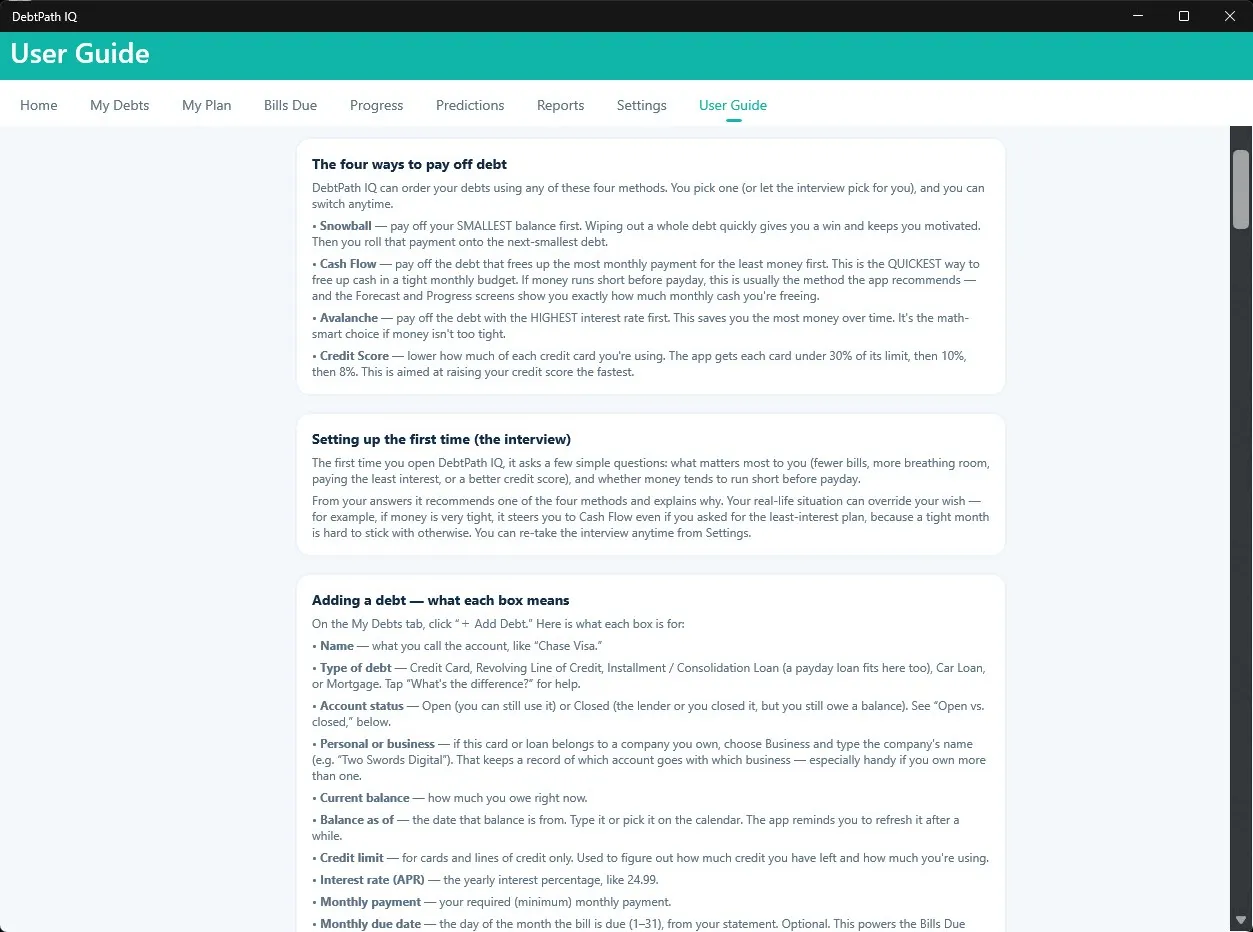
  2. A page of the DebtPath IQ User Guide with three panels. “The four ways to pay off debt” defines Snowball as paying the smallest balance first for motivation, Cash Flow as paying the debt that frees the most monthly payment for the least money, Avalanche as paying the highest interest rate first to save the most money, and Credit Score as lowering card utilization below 30%, then 10%, then 8%. “Setting up the first time (the interview)” explains that the app asks what matters most and whether money runs short before payday, then recommends a method and explains why, noting a tight month can override the wish for the least-interest plan. “Adding a debt — what each box means” then defines every field on the Add Debt form, including name, type of debt, account status, personal or business, current balance, balance as of, credit limit, interest rate, monthly payment, and monthly due date.
    Every method, and every box you have to fill in

    All four methods defined in one place, in the order a person actually asks about them — and then the part most manuals skip: every single box on the Add Debt form gets its own line. What “balance as of” means, why the credit limit matters, what counts as a personal versus a business account. Notice the interview explanation too: it admits the app will override what you asked for if your month is too tight to sustain it, and says why.

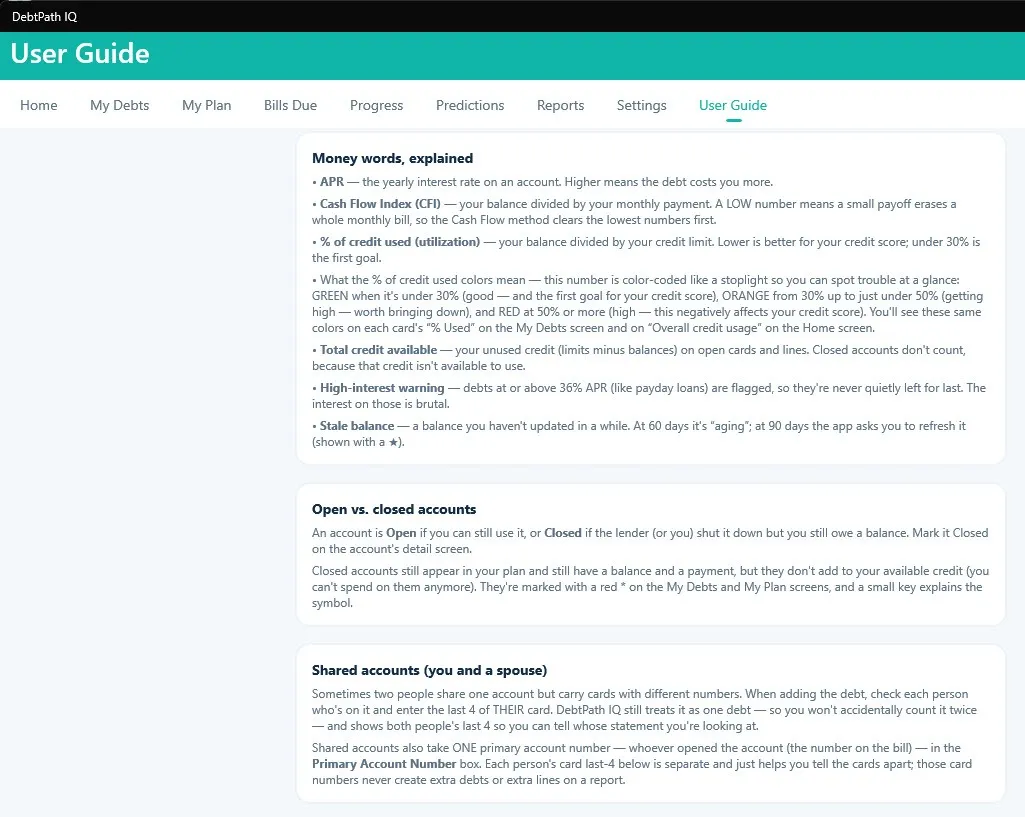
  3. A page of the DebtPath IQ User Guide with three panels. “Money words, explained” defines APR, Cash Flow Index as balance divided by monthly payment, percent of credit used and what its green, orange, and red colour coding mean, total credit available, the high-interest warning at 36% APR or above, and a stale balance that ages at 60 days and prompts a refresh at 90. “Open vs. closed accounts” explains that closed accounts still appear in your plan and still carry a payment but no longer add to available credit. “Shared accounts (you and a spouse)” explains that when two people carry cards with different numbers on one account, each person’s last four digits are recorded against a single primary account number, so the debt is never counted twice.
    The words nobody ever explains

    This is the page that decides whether a nervous buyer can use the software. APR, Cash Flow Index, utilization, stale balances — each gets a sentence in ordinary words, including what the green, orange, and red colours on your screen actually mean. The shared-accounts panel is the quiet standout: it explains how a couple carrying two cards on one account is recorded so the debt is never counted twice. Somebody thought about the real shape of a household here.

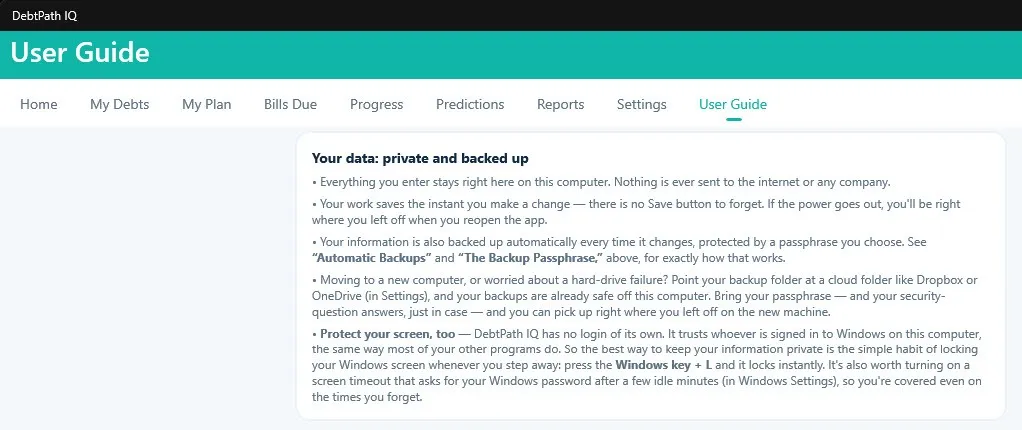
  4. A page of the DebtPath IQ User Guide titled “Your data: private and backed up.” It states that everything entered stays on this computer and nothing is ever sent to the internet or any company; that work saves the instant a change is made, with no Save button to forget; that information is backed up automatically every time it changes, protected by a passphrase you choose; that pointing the backup folder at a cloud folder such as Dropbox or OneDrive keeps backups safe off the computer and lets you resume on a new machine with your passphrase and security-question answers; and, under “Protect your screen, too,” that DebtPath IQ has no login of its own because it trusts whoever is signed in to Windows, so the best protection is locking the screen with the Windows key plus L and enabling a screen timeout that asks for your Windows password.
    Where your data lives

    The privacy promise, stated plainly and then stress-tested. Your data stays on this computer, saves the instant you change it, and backs itself up under a passphrase only you hold. Point the backup folder at Dropbox or OneDrive and you can pick up on a new machine where you left off.

    Then the paragraph that shows the manual is honest rather than promotional: DebtPath IQ™ has no login of its own. It trusts whoever is signed in to Windows — so the guide tells you the real answer, which is to press Windows + L when you step away and turn on a screen timeout. A weaker manual would have left that unsaid and let you assume a lock existed.

Ready to see these screens with your own numbers in them?

$49.99 once — the introductory price through November 30, 2026, then $79.99. On sale now for Windows 10 and 11; the Mac version goes on sale October 1, 2026. Your data never leaves your computer.

Get DebtPath IQ™ — $49.99