
DebtPath IQ™ screenshot tour
The Home tab
Your method, your numbers, and any emergency — on one screen.
Overview
Home is the screen you land on every time you open DebtPath IQ™. It names the payoff method your interview chose for you, totals up what you owe, and — this is the part most tools skip — warns you outright when one of your debts has become an emergency.
Screens
-
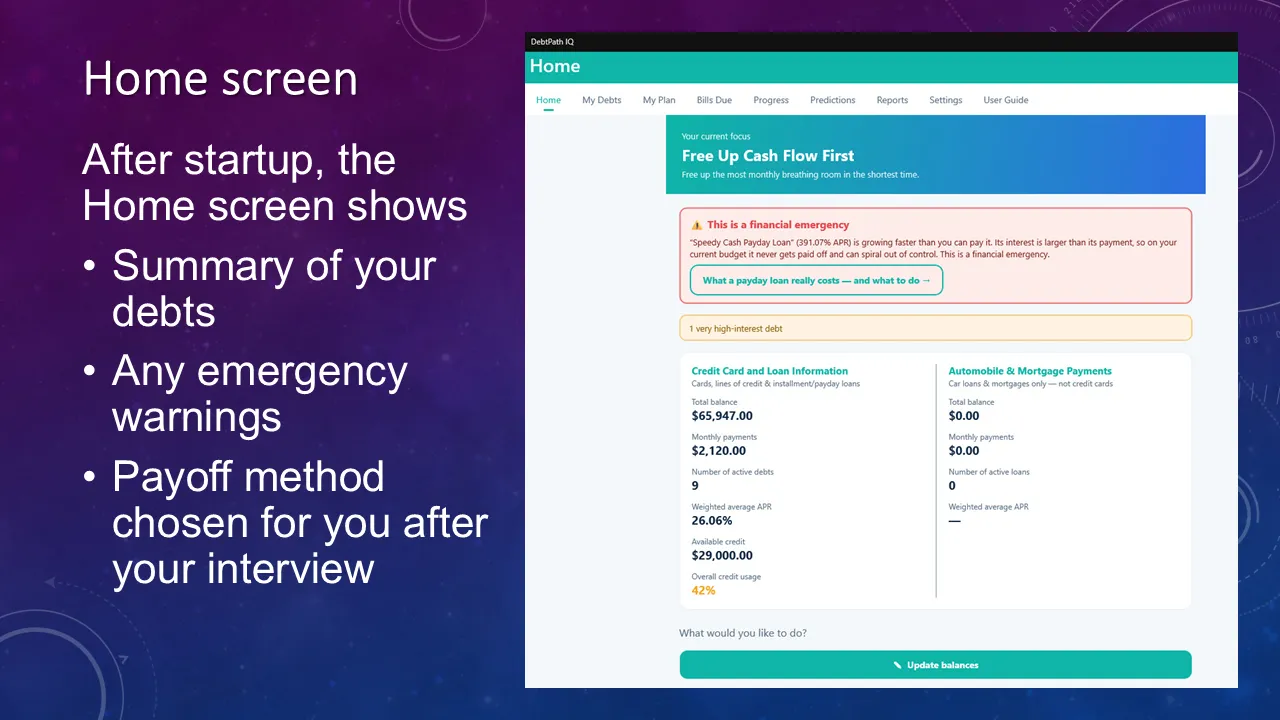
The dashboard Three things greet you. Your current focus — the method the interview picked, stated in plain words at the top. A summary of everything you owe, with the weighted average interest rate and credit usage worked out for you, and card-and-loan debt kept in its own column apart from a car or a mortgage, because those two behave nothing alike. And any emergency: here the app has spotted a payday loan whose interest outruns its own payment, flagged it in red, and offered to explain exactly what that loan is costing.
Ready to see these screens with your own numbers in them?
$49.99 once — the introductory price through November 30, 2026, then $79.99. On sale now for Windows 10 and 11; the Mac version goes on sale October 1, 2026. Your data never leaves your computer.
Get DebtPath IQ™ — $49.99